Saturday, January 5, 2013

Use Test Manager for Silverlight Application

Use Test Manager for Silverlight Application

Step:

1. Test Plan

2. Suite

3. Test Case

4. Action

5. Record

6. Play


If you want to use Test Manager for Silverlight Application and you haven't installed it then you can refer [my post]


Step 1:  Test Plan

When you open Test Manager then you see a dialog box. This dialog box shows your test plan from TFS.


About Test Plan : Test Plan is a folder and it is a Root Node. for example Project Name.

if you are looking for new test plan then click on add button of top of dialog. add new Test Plan


Step 2: Suite

Click on New Button and click on suite.

now you can create a suite

About Suite : Suite is a logical group of your module. for example Login Suite


Step 3: Test Case

Now time to create Test Case.Click on new button and give title of Test Case and detail

Step 4: Action

Add action for test case

Step 5: Record

Now It records the test.

Step: 6:

Play test cases.

so enjoy with Test Manager. It is nice tool to make automated test cases.

Sunday, July 8, 2012

Remove duplicate bookmarks in chrome browser


Remove duplicate bookmarks in chrome browser by using Bookmark Sentry

I had lot of bookmarks and there is lot repetitive. Now I need a tool which can delete duplicate and dead bookmark.

After Goggling, found a nice extension Bookmark Sentry. It finds duplicate and dead link.
So now how to use this, there are few steps to follow-

1.      Install bookmark sentry from Chrome web store

2.      Open Extension Page – Go to Tool -> Extension

3.      Click on Options button from Bookmark Sentry


4.      Click on Scan,   bookmarks get scanned

5.      Now you have option to delete duplicate and bed links

You have various options in this app to make it default on specific time.

Tuesday, April 10, 2012

Configure Test Manager for Silverlight Application

Test Manager is a automated testing tool from Microsoft.You can download it from Microsoft Website.
but it is not easy to configure for silverlight application.
For Silverlight Application there are some other work which require.
Steps :
1. Download Test manager
2. Feature pack 2
3. Download Update (In case if sp1 is not installed)
4. Attach Dll in Silverlight project

Step 1 :
Test manager setup
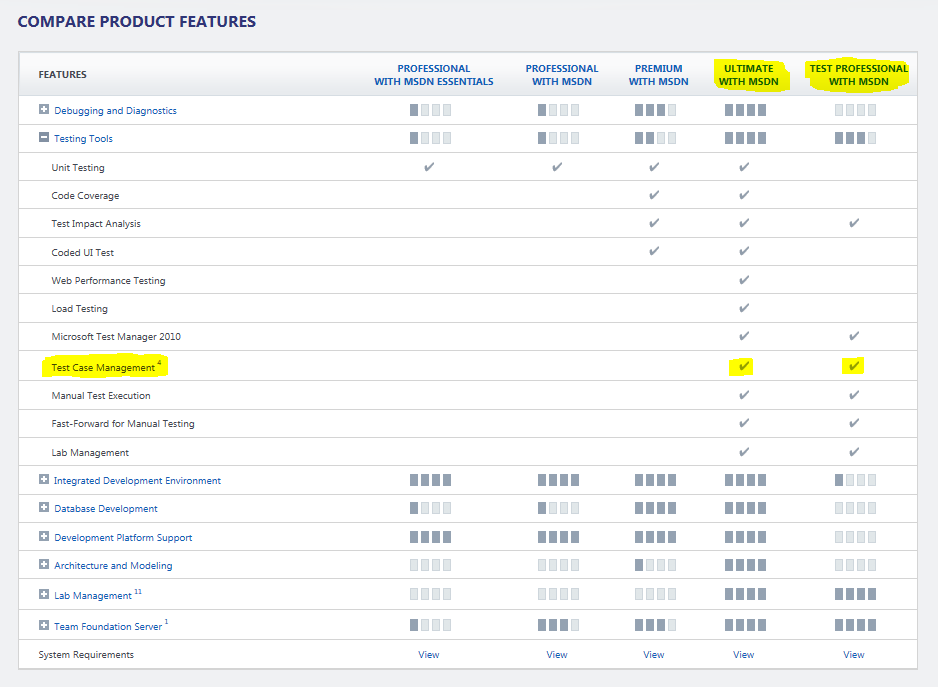
 > Test Manager is available if you have visual studio 2010 ultimate.
 > If you do not have visual studio ultimante and still you require then you should go for
Test Professional. you can see comparion from here


so download and install it.

Step 2 :
You requier feature pack 2 : you can download from here
Visual Studio 2010 Feature Pack 2 has one dll which need to attach with our silverlight project. the
dll is "Microsoft.VisualStudio.TestTools.UITest.Extension.SilverlightUIAutomationHelper.dll"


Step 3 :
when you install feature pack 2 then it requires a update. Feature pack 2 asks to download and install that update(it is not require if you have service pack 2)

Step 4 :
Attach Dll in Silverlight project
You can add require dll from add refearence of silverlight application in solution.

now everything is done for Test Manager.
you can see Test Mananger from your Start menu within Visual Studio 2010


We will see in next post about how to use it

Saturday, April 7, 2012

Ranking of Programming Languages

The TIOBE programming community index shows the popularity of programming languages. This index may be used to check our programming skills are up to date or not. It does not matter about technology rather than logic. But language shows its power. So here you can see updated index, growth of language and their history. See here


Sunday, January 22, 2012

Extension Method


An extension method is a language feature of c# from 3.0. A programmer always faces problem when he/she needs to add a new method in existing class. If it is required then what we can do are

1. Inherit the existing class in new class and implement the method
2. Implement the required functionality in other class with static modifier
3. Use aggregation

But all have its disadvantage like if we go for first option and existing class is sealed (restrict inheritance). Second option is solved problem of first one but here we have to use someone else reference (other class).
But this new feature of extension method solves these problem (some other also). This approach requires a static class with a static method.

Example

class Car 
{
}
static class ExtensionMethods
{
    public static void GetCar(this Car c)   
    {                               
        Console.WriteLine("Call extension method");
    }                               
}
The signature of extension method there is a "this" before the first argument. It shows that this is an extension method. So we can call our extension method
Car c = new Car();
c.GetCar();
Here we are calling GetCar method by car reference with.