Thursday, September 24, 2015

Turbo C/C++ for Windows 7,8 and 10 with full screen mode

Recently I needed Turbo C and download from internet. I was little surprised why it is not working on full screen mode on windows 8. After spending lot of time on internet I found some trick and turbo C which works on full screen mode on Windows 7, 8 and 10.

If you are looking Turbo C and need to have in maximize mode then you can check this artical.
It might help you. It works fine on every version of Windows

1.You have to download TurboC from following location.
https://www.dropbox.com/s/jx330ion8wyo4jp/TurboC%2B%2B.rar?dl=0
2.You need to extract the folder.
3.Copy the folder in C Drive.
4.Run the exe from this location "C:\TurboC++\DOSBox.exe".
5.You can open HelloWorld program, compile and run it.

please let me know if you face any issue.

Saturday, July 13, 2013

Differences between bitwise OR and Logical OR in C#


Difference between bitwise OR and Logical OR in C#

Laugh between | and ||

Most of time we use bitwise OR rather than logical OR. But there is a very small thing which can sleep our eyes. Recently I was using and surprised in one business logic which was going fail. Then I relies it's been serious to use it.


            int a1 = 0, b1 = 0;

            bool x = (a1 == 0 || ++b1 != 0);/* here b1 is still 0. the '++b1 != 0' was not evaluated */

            Console.Write(x);/* True*/
            Console.Write(a1);/* 0 */
            Console.Write(b1);/* 0 */

            int a2 = 0, b2 = 0;

            bool y = (a2 == 0 | ++b2 != 0);/* here b2 is 1. the '++b2 != 0' was evaluated. */

            Console.Write(y);/* True */
            Console.Write(a2);/* 0 */
            Console.Write(b2);/* 1 */

I hope it helps you somewhere.


Sunday, July 7, 2013

Differences between Aggregation and Composition

UML diagram in Software development shows complete system by using its notation. Those are classes, properties, operation and relationships (Instance and Class Level). The most interesting notations in UML are relationship. Relationship is link between entities. There is a small extent between Aggregation and Composition in instance level relationship.

Association: It lines between two entities.

Aggregation: It shows “Has a” relationship. It is more specific than association. It is used when one part is container of other side. But contains classes do not have a strong dependency on the container. Means when container is disposed then contents are not destroyed.

Notation- in UML diagram aggregation is represented by hollow diamond shape.


Example - A Student and a Course are having an Aggregation relationship. 

    public class Student
    {
        private Course course;
        public Student(Course c)
        {
            this.course = c;
        }
    }
    public class Course
    {


    }

Composition: It shows “Owns a” relationship. It is even more specific than aggregation. It gives a high dependency on container. Where container is being disposed then contains classes must be destroyed.

Notation- in UML diagram Composition is represented by filled diamond shape.


Example - A Car and an Engine are having a Composition relationship. 

      public class Car
    {
        private Engine engine;
        public Car()
        {
            engine = new Engine();
        }
    }

    public class Engine
    {

    }

Now we are in differentiation in aggregation and composition- the relationship in association is object level. It shows container and part. Aggregation has soft relationship but composition is based on strong and believes to destroy its complete parts.

Saturday, February 2, 2013

NHibernate - Generate Id from seed table


Recently I came across a problem where I had to auto generate entity Id by using seed table of database. I was not allowed to keep auto generate at database level.  I was using NHibernate ORM.

Scenario:
I have a seed table.
   Table : Seed
   Columns :
            1.       TableName
            2.       LastId
      I have to use this table to create id for other tables. I was looking a better way to accomplish this.

Solution :
            1.       Create a seed generator class - NHibernate gives an interface IIdentifierGenerator which really helps lot. It gives a signature to use and pass id.


namespace SimpleNHibernateClient.ConsoleApplication
{
    using NHibernate.Id;

    /// <summary>
    /// Seed Generator
    /// </summary>
    public class SeedGenerator<T> : IIdentifierGenerator
    {
        public object Generate(NHibernate.Engine.ISessionImplementor session, object obj)
        {
            return 1;/* Take it from seed table corresponding T. */
        }
    }
}


          2.       Entity Class-This is a entity class to be saved into database.

namespace SimpleNHibernateClient.ConsoleApplication
{
    public class Student
    {
        public virtual int Id { get; set; }
        public virtual string Name { get; set; }
    }
}

         3.       Mapping Class-This is a mapping class to be used for mapping and calling seed generator.


namespace SimpleNHibernateClient.ConsoleApplication
{
    using FluentNHibernate.Mapping;

    public class StudentMap : ClassMap<Student>
    {
        public StudentMap()
        {
            Table("Student");
            Id(x => x.Id, "Id").GeneratedBy.Custom<SeedGenerator<Student>>();
            Map(x => x.Name, "Name");
        }
    }
}

Now it gets generated by Generate Method.

Saturday, January 5, 2013

Use Test Manager for Silverlight Application

Use Test Manager for Silverlight Application

Step:

1. Test Plan

2. Suite

3. Test Case

4. Action

5. Record

6. Play


If you want to use Test Manager for Silverlight Application and you haven't installed it then you can refer [my post]


Step 1:  Test Plan

When you open Test Manager then you see a dialog box. This dialog box shows your test plan from TFS.


About Test Plan : Test Plan is a folder and it is a Root Node. for example Project Name.

if you are looking for new test plan then click on add button of top of dialog. add new Test Plan


Step 2: Suite

Click on New Button and click on suite.

now you can create a suite

About Suite : Suite is a logical group of your module. for example Login Suite


Step 3: Test Case

Now time to create Test Case.Click on new button and give title of Test Case and detail

Step 4: Action

Add action for test case

Step 5: Record

Now It records the test.

Step: 6:

Play test cases.

so enjoy with Test Manager. It is nice tool to make automated test cases.

Sunday, July 8, 2012

Remove duplicate bookmarks in chrome browser


Remove duplicate bookmarks in chrome browser by using Bookmark Sentry

I had lot of bookmarks and there is lot repetitive. Now I need a tool which can delete duplicate and dead bookmark.

After Goggling, found a nice extension Bookmark Sentry. It finds duplicate and dead link.
So now how to use this, there are few steps to follow-

1.      Install bookmark sentry from Chrome web store

2.      Open Extension Page – Go to Tool -> Extension

3.      Click on Options button from Bookmark Sentry


4.      Click on Scan,   bookmarks get scanned

5.      Now you have option to delete duplicate and bed links

You have various options in this app to make it default on specific time.

Tuesday, April 10, 2012

Configure Test Manager for Silverlight Application

Test Manager is a automated testing tool from Microsoft.You can download it from Microsoft Website.
but it is not easy to configure for silverlight application.
For Silverlight Application there are some other work which require.
Steps :
1. Download Test manager
2. Feature pack 2
3. Download Update (In case if sp1 is not installed)
4. Attach Dll in Silverlight project

Step 1 :
Test manager setup
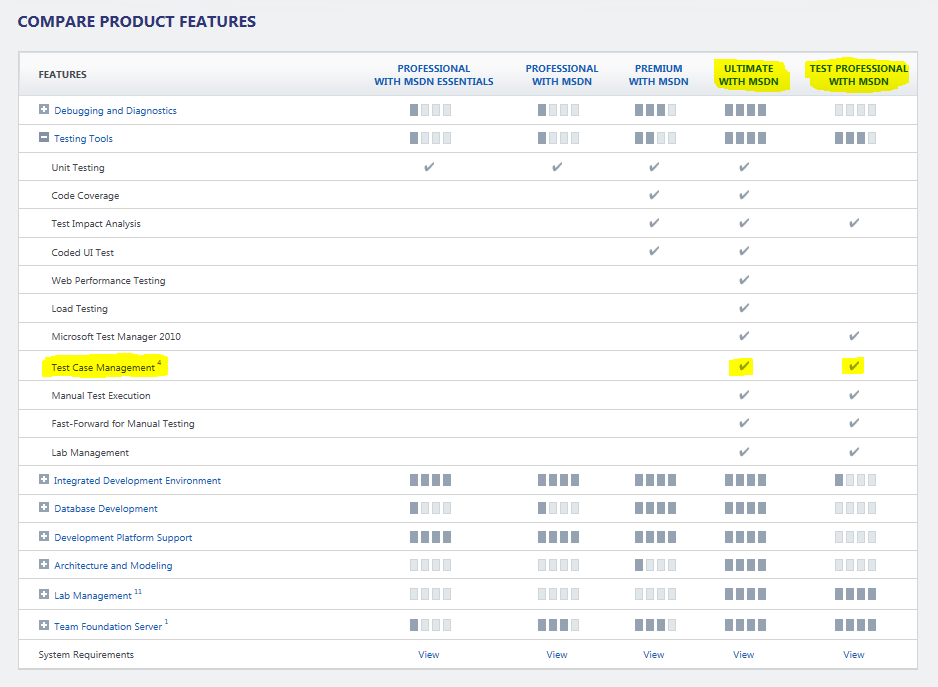
 > Test Manager is available if you have visual studio 2010 ultimate.
 > If you do not have visual studio ultimante and still you require then you should go for
Test Professional. you can see comparion from here


so download and install it.

Step 2 :
You requier feature pack 2 : you can download from here
Visual Studio 2010 Feature Pack 2 has one dll which need to attach with our silverlight project. the
dll is "Microsoft.VisualStudio.TestTools.UITest.Extension.SilverlightUIAutomationHelper.dll"


Step 3 :
when you install feature pack 2 then it requires a update. Feature pack 2 asks to download and install that update(it is not require if you have service pack 2)

Step 4 :
Attach Dll in Silverlight project
You can add require dll from add refearence of silverlight application in solution.

now everything is done for Test Manager.
you can see Test Mananger from your Start menu within Visual Studio 2010


We will see in next post about how to use it

Saturday, April 7, 2012

Ranking of Programming Languages

The TIOBE programming community index shows the popularity of programming languages. This index may be used to check our programming skills are up to date or not. It does not matter about technology rather than logic. But language shows its power. So here you can see updated index, growth of language and their history. See here


Sunday, January 22, 2012

Extension Method


An extension method is a language feature of c# from 3.0. A programmer always faces problem when he/she needs to add a new method in existing class. If it is required then what we can do are

1. Inherit the existing class in new class and implement the method
2. Implement the required functionality in other class with static modifier
3. Use aggregation

But all have its disadvantage like if we go for first option and existing class is sealed (restrict inheritance). Second option is solved problem of first one but here we have to use someone else reference (other class).
But this new feature of extension method solves these problem (some other also). This approach requires a static class with a static method.

Example

class Car 
{
}
static class ExtensionMethods
{
    public static void GetCar(this Car c)   
    {                               
        Console.WriteLine("Call extension method");
    }                               
}
The signature of extension method there is a "this" before the first argument. It shows that this is an extension method. So we can call our extension method
Car c = new Car();
c.GetCar();
Here we are calling GetCar method by car reference with.

Tuesday, December 6, 2011

Event

Event:
An event in C# is a way for a class to provide notifications to clients of that class when some interesting thing happens to an object.

Example:

    class Program
    {
        static void Main(string[] args)
        {
            var dialogForm = new DialogForm();
            dialogForm.OnDialogClosed += new DialogForm.DialogClosed(dialogForm_OnDialogClosed);

            Console.WriteLine("Dialog is shown.");
            dialogForm.ShowDialog();
            
            Console.WriteLine("Dialog data is saved.");
            dialogForm.SaveData();

            Console.ReadLine();
        }

        static void dialogForm_OnDialogClosed(object sender)
        {
            //Take action after closed dialog
            Console.WriteLine("Dialog is closed.");
        }
    }

    class DialogForm
    {
        public delegate void DialogClosed(object sender);
        public event DialogClosed OnDialogClosed;
        
        public void ShowDialog()
        {
            
        }
        public void SaveData()
        {
            if (OnDialogClosed != null)
                OnDialogClosed(this);
        }
    }

Explanation:
Here DialogClosed is a delegate and OnDialogClosed is an event.
Scenario : We want to show a dialog form where user can enter some data and after that he can save data. When data has been saved then a closed event fire from Dialog to notify caller that I have closed.

Sunday, December 4, 2011

Anonymous Method

Anonymous Method :
We have seen a delegate now it's time to know about Anonymous Method. So we can create a delegate instance without using method name.

Example :
    class Program
    {
        public delegate int OperationDelegate(int a, int b);
        static void Main(string[] args)
        {
            OperationDelegate addOperation = delegate(int a, int b)
            {
                return a + b;
            };
            Console.WriteLine(addOperation(10, 20));
            Console.Read();
        }
    }

Explanation:
We have put a method inside a block. which is anonymous method.

Wednesday, October 5, 2011

World’s first chromebook

World’s first chromebook
Samsung Chromebook Series 5: What You Need to Know

Google and Samsung have unveiled the “world’s first chromebook,” the Chromebook Series 5. We had the opportunity to take it for a test drive.

Tuesday, June 14, 2011

AT Commands

By Jugal Panchal

What is an AT command?

AT commands allow giving instructions to both mobile devices and ordinary landline telephones. The commands are sent to the phone's modem, which can be a GSM modem or PC modem. Different phones support different sets of AT commands. This means that a specific phone might not support all AT commands listed at end of this article. Currently there is no authoritative list available of supported AT commands by all phones.

Overview

This article focuses on AT commands on Nokia's GSM and CDMA products only. Different manufacturers may have different sets of AT commands. Fortunately, many AT commands are the same. Mobile device manufacturers may also give attention to operators to allow or not to allow some commands on phones.

AT commands can be used for operations that are usually done from the keypad, for instance calling a number, sending, reading, or deleting an SMS, setting the SMSC number, looking for a GPRS access point, reading and deleting phonebook data, reading the battery status, reading the signal strength, and so on. When you want to make a PC-based application to interface a mobile phone using USB or Bluetooth, these commands are needed to communicate with mobile phones. Nokia provides an AT command set guide, where you can see the basic command syntax and the response of the command in various situations. See the Related Links section at the end of this article.

Using AT Commands with .Net

Before going for developing application we have to do some basic step with OS:

1. For AT commands to work, we have to connect our device to our PC either by Bluetooth or USB cable (just Google if you don’t know how to connect mobile with PC using either Bluetooth or USB cable).

2. After making connection you need to check its port which is very easy. Just go to control panel and open Phone and Model option and you will see something as below.


There is a Modem with its port. You have to remember that port in this case that is COM6.

3. Now comes the coding part

a. Design the form as below


Note: At the time of design drag a serial port components from toolbox in Components Tab.

b. Load all Com Port from your PC to combobox.

private void frmATCommandTest_Load(object sender, EventArgs e)
{
/*
* Name of all ports are copied to Combobox
*/
this.cmbComPorts.Items.AddRange(System.IO.Ports.SerialPort.GetPortNames());
}

c. There are various baud rates as per speed.

i. 110
ii. 300
iii. 1200
iv. 2400
v. 4800
vi. 9600
vii. 19200
viii. 38400
ix. 57600
x. 115200
xi. 230400
xii. 460800
xiii. 921600

So add as items to second combobox.

d. To connect with device

private void btnConnect_Click(object sender, EventArgs e)
{
try
{
if (!this.serialPort1.IsOpen)
{
this.serialPort1.PortName = cmbComPorts.Text;
this.serialPort1.Open();
this.serialPort1.BaudRate = cmbBaudRate.Text;
this.serialPort1.DataBits = 8;
this.serialPort1.StopBits = System.IO.Ports.StopBits.One;
this.serialPort1.Parity = System.IO.Ports.Parity.None;
this.serialPort1.Handshake = System.IO.Ports.Handshake.None;

MessageBox.Show(
"\nCONNECTED SUCESSFULLY\n", "Information");
}
else
{
MessageBox.Show(
"\nALLREADY CONNECTED\n", "Information");
}
}
catch
{
MessageBox.Show(
"\nCOMMPORT IS NOT CONNECTED", "Information");
}
}

For closing connection just call close method of Serial Port.

e. It's time to code for sending a message now

public void btnSend_Click(object sender, EventArgs e)
{
if (this.serialPort1.IsOpen)
{
serialPort1.BaseStream.Flush();
string cb = char.ConvertFromUtf32(26);
System.Threading.Thread.Sleep(
2000);

this.serialPort1.Write("AT+CMGF=1\r");
//Ufone Service Center
this.serialPort1.Write("AT+CSCA=servicecenter\r\n");
this.serialPort1.Write("AT+CMGS=\"" + txtPhoneNumber.Text + "\"\r\n");
this.serialPort1.Write(txtMessage.Text + cb);

MessageBox.Show(
"\nMessage Sent\n", "Information");
}
else
{
MessageBox.Show(
"\nSerial Port Is Not Open\n", " ERROR ");
}
}

Now it is a time to run this application. It should run successfully in your Visual Studio. If you face any error the Google it or simply ask me.

To operate the code you have to select the communication port with which your mobile has been connected (in our case it is COM6) and choose Baud Rate after click on connect button. This should show you a message for successful connection. Now type the number and message and click ‘send’ button.

There are lots of many things (such as call, miss call (you can set time for fun), end call, bulk message, send multiple copy of message, check IMEI number, battery status, manufacture name and date, date and time etc.) we can do with AT Commands but for now we will stop here. For more details I have mentioned links at end of article. I have also mentioned at set of AT Commands that might come handy for you if you would like to test it.

AT Commands set for Nokia GSM and CDMA products: (These can work on other mobile set too)

Call control:
Command - Description
ATA - Answer command
ATD - Dial command
ATH - Hang up call
ATL - Monitor speaker loudness
ATM - Monitor speaker mode
ATO - Go on-line
ATP - Set pulse dial as default
ATT - Set tone dial as default
AT+CSTA - Select type of address
AT+CRC - Cellular result codes

Data card control commands:
Command - Description
ATI - Identification
ATS - Select an S-register
ATZ - Recall stored profile
AT&F - Restore factory settings
AT&V - View active configuration
AT&W - Store parameters in given profile
AT&Y - Select Set as power up option
AT+CLCK - Facility lock command
AT+COLP - Connected line identification presentation
AT+GCAP - Request complete capabilities list
AT+GMI - Request manufacturer identification
AT+GMM - Request model identification
AT+GMR - Request revision identification
AT+GSN - Request product serial number identification (IMEI)

Phone control commands:
Command - Description
AT+CBC - Battery charge
AT+CGMI - Request manufacturer identification
AT+CGMM - Request model identification
AT+CGMR - Request revision identification
AT+CGSN - Request product serial number identification
AT+CMEE - Report mobile equipment error
AT+CPAS - Phone activity status
AT+CPBF - Find phone book entries
AT+CPBR - Read phone book entry
AT+CPBS - Select phone book memory storage
AT+CPBW - Write phone book entry
AT+CSCS - Select TE character set
AT+CSQ - Signal quality

Computer data card interface commands:
Command - Description
ATE - Command Echo
ATQ - Result code suppression
ATV - Define response format
ATX - Response range selection
AT&C - Define DCD usage
AT&D - Define DTR usage
AT&K - Select flow control
AT&Q - Define communications mode option
AT&S - Define DSR option
AT+ICF - DTE-DCE character framing
AT+IFC - DTE-DCE Local flow control
AT+IPR - Fixed DTE rate

Service:
Command - Description
AT+CLIP - Calling line identification presentation
AT+CR - Service reporting control
AT+DR - Data compression reporting
AT+ILRR - DTE-DCE local rate reporting

Network communication parameter commands:
Command - Description
ATB - Communications standard option
AT+CBST - Select bearer service type
AT+CEER - Extended error report
AT+CRLP - Radio link protocol
AT+DS - Data compression

Miscellaneous commands:
Command - Description
A/ - Re-execute command line
AT? - Command help
AT*C - Start SMS interpreter
AT*T - Enter SMS block mode protocol
AT*V - Activate V.25bis mode
AT*NOKIATEST - Test command
AT+CESP - Enter SMS block mode protocol

SMS commands

SMS text mode:
Command - Description
AT+CSMS - Select message service
AT+CPMS - Preferred message storage
AT+CMGF - Message format
AT+CSCA - Service centre address
AT+CSMP - Set text mode parameters
AT+CSDH - Show text mode parameters
AT+CSCB - Select cell broadcast message types
AT+CSAS - Save settings
AT+CRES - Restore settings
AT+CNMI - New message indications to TE
AT+CMGL - List messages
AT+CMGR - Read message
AT+CMGS - Send message
AT+CMSS - Send message from storage
AT+CMGW - Write message to memory
AT+CMGD - Delete message

SMS PDU:
Command - Description
AT+CMGL - List Messages
AT+CMGR - Read message
AT+CMGS - Send message
AT+CMGW - Write message to memory

Related links


Wednesday, May 11, 2011

Regular-Expression

If you are a developer from any language and you need to use Regular-Expression then you can use this web site for searching expression :)

The Internet's first Regular Expression Library
http://www.regexlib.com/


Thursday, February 24, 2011

Open your all favorite websites by only once click

If you have a list of favorite websites and you always need to open those everyday so you have to go one by one. now if you want to change the way to open all by only once click then copy below text and paste in notepad and save by .bat extension with any name.

@echo off
start firefox.exe "hotmail.com" "twitter.com" "linkedin.com"

Now just a click on that file.


Monday, February 7, 2011

Visual Studio Tools

Visual Studio 2010 Productivity Power Tools :

1. GhostDoc_v3.0
2. dotNetFx40_Full_x86_x64.exe
3. PowerCommands.vsix
4. ProPowerTools.vsix
5. ThemeManagerPackage.vsix
6. Solution Navigation

There are some tools for analysis code and they suggest :
1. ReSharper
2. FxCop
3. CodeRush


Solution Navigator
http://visualstudiogallery.msdn.microsoft.com/d0d33361-18e2-46c0-8ff2-4adea1e34fef/

PowerCommands 10.0
http://visualstudiogallery.msdn.microsoft.com/e5f41ad9-4edc-4912-bca3-91147db95b99?SRC=Home

VSCommands 2010
http://visualstudiogallery.msdn.microsoft.com/d491911d-97f3-4cf6-87b0-6a2882120acf?SRC=Home

Git tooling for .NET developers
http://devlicio.us/blogs/krzysztof_kozmic/archive/2011/01/26/git-tooling-for-net-developers.aspx


Sunday, February 6, 2011

Thought of the day

The greatest quest in life is to reach our’s potential

The greatest mistake you can make in life is to be continually fearing you will make one.